Suggested Products






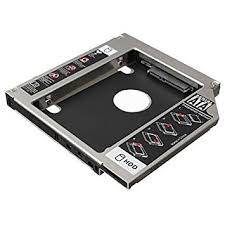
Transform your laptop's optical drive bay into a high-speed storage slot with the Universal SSD/HDD Caddy. As modern users shift away from physical discs, this caddy repurposes that empty space for essential data storage, dual-booting OS setups, or high-speed SSD caching.
Quickly add a second hard drive to store backup files, large media libraries, or games without carrying an external portable drive.
Install your operating system on a new SSD inside the caddy to breathe new life into older laptops with lightning-fast boot times and app launches. The rigid aluminum chassis acts as a heat sink, effectively drawing heat away from the drive to prevent thermal throttling and ensure long-term drive health.
The caddy is designed to accept your laptop's original DVD drive faceplate (bezel), maintaining the original aesthetic look of your device. Use the second drive to install an alternative operating system (like Linux or a clean Windows install) and select your boot drive via the BIOS.
Have question about this product? Get specific details about this product from expert.
There are no questions asked yet. Be the first one to ask a question.